Debugging
When a contract call fails, the error message alone may not always provide enough information to identify the root cause
of the issue. To aid in debugging, snforge offers the following features:
Live Debugging
💡 Tip
Make sure to check Cairo Debugger website for more information!
⚠️ Warning
Entering contract calls are currently not supported. Read more here.
From version 0.60.0 onwards, the snforge is integrated with Cairo Debugger,
which enables step-through, breakpoint-based debugging of tests.
Prerequisites
Live debugging relies on debug information provided by Scarb. To generate the necessary debug information, you need to have:
snforgeversion0.60.0or higher.- Scarb version
2.18.0or higher. Scarb.tomlfile with compiler configuration equivalent to the following one:
[profile.dev.cairo]
skip-optimizations = true
add-statements-code-locations-debug-info = true
add-statements-functions-debug-info = true
add-functions-debug-info = true
add-types-debug-info = true
Debugging in VSCode
-
Open your Cairo project in VSCode.
-
Make sure the latest Cairo extension is installed.
-
Set breakpoints in your cairo files.
-
Use the extension's ▶ Debug Test code lens (displayed above each test function) to launch the debugger - it will invoke
snforgewith--launch-debuggerautomatically and start a debugging session.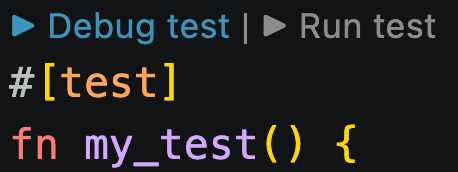
Check this guide for details on how to use live debugging with VSCode.
Trace
Usage
📝 Note
Currently, the flow of execution trace is only available at the contract level. In future versions, it will also be available at the function level.
You can inspect the flow of execution for your tests using the --trace-verbosity or --trace-components flags when
running the snforge test command. This is useful for understanding how contracts are interacting with each other
during your tests, especially in complex nested scenarios.
Trace Components
The --trace-components flag allows you to specify which components of the trace you want to see. You can choose from:
contract-name: the name of the contract being calledentry-point-type: the type of the entry point being called (e.g.,External,L1Handler, etc.)calldata: the calldata of the call, transformed for displaycontract-address: the address of the contract being calledcaller-address: the address of the caller contractcall-type: the type of the call (e.g.,Call,Delegate, etc.)call-result: the result of the call, transformed for displayevents: raw events emitted by the call, shown as Starknetkeysanddatagas: estimated L2 gas consumed by the call
Example usage:
$ snforge test --trace-components contract-name call-result call-type
Output:
[test name] debugging_integrationtest::test_trace::test_debugging_trace_success
├─ [selector] execute_calls
│  ├─ [contract name] SimpleContract
│  ├─ [call type] Call
│  ├─ [call result] success: array![RecursiveCall { contract_address: ContractAddress([..]), payload: array![RecursiveCall { contract_address: ContractAddress([..]), payload: array![] }, RecursiveCall { contract_address: ContractAddress([..]), payload: array![] }] }, RecursiveCall { contract_address: ContractAddress([..]), payload: array![] }]
│  ├─ [selector] execute_calls
│  │  ├─ [contract name] SimpleContract
│  │  ├─ [call type] Call
│  │  ├─ [call result] success: array![RecursiveCall { contract_address: ContractAddress([..]), payload: array![] }, RecursiveCall { contract_address: ContractAddress([..]), payload: array![] }]
│  │  ├─ [selector] execute_calls
│  │  │  ├─ [contract name] SimpleContract
│  │  │  ├─ [call type] Call
│  │  │  └─ [call result] success: array![]
│  │  └─ [selector] execute_calls
│  │     ├─ [contract name] SimpleContract
│  │     ├─ [call type] Call
│  │     └─ [call result] success: array![]
│  └─ [selector] execute_calls
│     ├─ [contract name] SimpleContract
│     ├─ [call type] Call
│     └─ [call result] success: array![]
└─ [selector] fail
   ├─ [contract name] SimpleContract
   ├─ [call type] Call
   └─ [call result] panic: (0x1, 0x2, 0x3, 0x4, 0x5)
Verbosity Levels
The --trace-verbosity flag accepts the following values:
minimal: shows test name, contract name, and selectorstandard: includes test name, contract name, selector, calldata, and call resultdetailed: displays the entire trace, including internal calls, caller addresses, emitted events, and panic reasons
Example usage:
$ snforge test --trace-verbosity standard
Output:
[test name] debugging_integrationtest::test_trace::test_debugging_trace_success
├─ [selector] execute_calls
│  ├─ [contract name] SimpleContract
│  ├─ [calldata] array![RecursiveCall { contract_address: ContractAddress([..]), payload: array![RecursiveCall { contract_address: ContractAddress([..]), payload: array![] }, RecursiveCall { contract_address: ContractAddress([..]), payload: array![] }] }, RecursiveCall { contract_address: ContractAddress([..]), payload: array![] }]
│  ├─ [call result] success: array![RecursiveCall { contract_address: ContractAddress([..]), payload: array![RecursiveCall { contract_address: ContractAddress([..]), payload: array![] }, RecursiveCall { contract_address: ContractAddress([..]), payload: array![] }] }, RecursiveCall { contract_address: ContractAddress([..]), payload: array![] }]
│  ├─ [selector] execute_calls
│  │  ├─ [contract name] SimpleContract
│  │  ├─ [calldata] array![RecursiveCall { contract_address: ContractAddress([..]), payload: array![] }, RecursiveCall { contract_address: ContractAddress([..]), payload: array![] }]
│  │  ├─ [call result] success: array![RecursiveCall { contract_address: ContractAddress([..]), payload: array![] }, RecursiveCall { contract_address: ContractAddress([..]), payload: array![] }]
│  │  ├─ [selector] execute_calls
│  │  │  ├─ [contract name] SimpleContract
│  │  │  ├─ [calldata] array![]
│  │  │  └─ [call result] success: array![]
│  │  └─ [selector] execute_calls
│  │     ├─ [contract name] SimpleContract
│  │     ├─ [calldata] array![]
│  │     └─ [call result] success: array![]
│  └─ [selector] execute_calls
│     ├─ [contract name] SimpleContract
│     ├─ [calldata] array![]
│     └─ [call result] success: array![]
└─ [selector] fail
   ├─ [contract name] SimpleContract
   ├─ [calldata] array![0x1, 0x2, 0x3, 0x4, 0x5]
   └─ [call result] panic: (0x1, 0x2, 0x3, 0x4, 0x5)
Trace Output Explained
Here's what each tag in the trace represents:
| Tag | Description |
|---|---|
[test name] | The path to the test being executed, using the Cairo module structure. Indicates which test case produced this trace. |
[selector] | The name of the contract function being called. The structure shows nested calls when one function triggers another. |
[contract name] | The name of the contract where the selector (function) was invoked. Helps trace calls across contracts. |
[entry point type] | (In detailed view) Type of entry point used: External, Constructor, L1Handler. Useful to differentiate the context in which the call is executed. |
[calldata] | (In standard view and above) The arguments passed into the function call. |
[storage address] | (In detailed view) The storage address of the specific contract instance called. Helps identify which deployment is used if you're testing multiple. |
[caller address] | (In detailed view) The address of the account or contract that made this call. Important to identify who triggered the function. |
[call type] | (In detailed view) Call, Delegate. Describes how the function is being invoked. |
[call result] | (In standard view and above) The return value of the call, success or panic. |
[events] | (In detailed view) Raw Starknet events emitted by the call, shown as keys and data. |
[gas] | (In detailed view) L2 gas needed to execute the call. The calculation ignores state changes, calldata and signature lengths, L1 handler payload length and Starknet OS overhead. |
Backtrace
Prerequisites
Backtrace feature relies on debug information provided by Scarb. To generate the necessary debug information, you need to have:
- Scarb version
2.12.0or higher. Scarb.tomlfile with the following Cairo compiler configuration:
[profile.dev.cairo]
unstable-add-statements-code-locations-debug-info = true
unstable-add-statements-functions-debug-info = true
panic-backtrace = true
📝 Note
That
unstable-add-statements-code-locations-debug-info = trueandunstable-add-statements-functions-debug-info = truewill slow down the compilation and cause it to use more system memory. It will also make the compilation artifacts larger. So it is only recommended to add these flags when you need their functionality.
Usage
If your test or contract call fails and a backtrace can be generated, snforge will prompt you to run the operation again with the
SNFORGE_BACKTRACE=1 environment variable (if it’s not already configured). For example, you may see failure data like
this:
$ snforge test
Output:
Failure data:
    (0x417373657274206661696c6564 ('Assert failed'), 0x454e545259504f494e545f4641494c4544 ('ENTRYPOINT_FAILED'), 0x454e545259504f494e545f4641494c4544 ('ENTRYPOINT_FAILED'))
note: run with `SNFORGE_BACKTRACE=1` environment variable to display a backtrace
To enable backtrace, simply set the SNFORGE_BACKTRACE=1 environment variable and rerun the operation.
When enabled, the backtrace will display the call tree of the execution, including the specific line numbers in test code and contracts where the errors occurred. Here's an example of what you might see:
$ SNFORGE_BACKTRACE=1 snforge test
Output:
Failure data:
    (0x417373657274206661696c6564 ('Assert failed'), 0x454e545259504f494e545f4641494c4544 ('ENTRYPOINT_FAILED'), 0x454e545259504f494e545f4641494c4544 ('ENTRYPOINT_FAILED'))

stack backtrace:
   in contract 'InnerContract':
      0: core::panic_with_const_felt252
         at [..]lib.cairo:360:5
      1: core::panic_with_const_felt252
         at [..]lib.cairo:360:5
      2: backtrace_panic::InnerContract::__wrapper__InnerContract__inner
         at [..]lib.cairo:32:5

   in contract 'OuterContract':
      0: backtrace_panic::OuterContract::__wrapper__OuterContract__outer
         at [..]lib.cairo:13:5

   in test 'backtrace_panic::Test::test_contract_panics':
      0: (inlined) backtrace_panic::IOuterContractDispatcherImpl::outer
         at [..]lib.cairo:1:1
      1: backtrace_panic::Test::test_contract_panics
         at [..]lib.cairo:59:9
      2: backtrace_panic::Test::test_contract_panics__snforge_internal_test_generated
         at [..]lib.cairo:50:5
Advanced Configuration
For the most detailed backtrace information, you can add skip-optimizations = true to your Scarb.toml (requires Scarb >= 2.14.0).
This skips as much compiler optimizations as possible, keeping the compiled code closer to the original and allowing snforge to provide more complete and accurate backtrace information.
[cairo]
skip-optimizations = true
Learn more about this option in the Scarb documentation.
⚠️ Warning: Setting
skip-optimizations = truemay result in faster compilation, but much slower execution of the compiled code. If you need to deploy your contracts on Starknet, you should never compile them with this field set totrue.
Inlining
The single optimization that matters most for backtraces is inlining, which is enabled by default.
Therefore, inlined backtrace frames either disappear or collapse into a single (inlined) entry.
If you want fuller backtraces without turning off every optimization, you can target inlining directly with the inlining-strategy field.
Setting it to "avoid" makes the compiler inline only functions annotated with #[inline(always)]:
[profile.dev.cairo]
inlining-strategy = "avoid"
📝 Note: Setting
skip-optimizations = truealready impliesinlining-strategy = "avoid".
Example
$ SNFORGE_BACKTRACE=1 snforge test
Output:
Failure data:
    (0x417373657274206661696c6564 ('Assert failed'), 0x454e545259504f494e545f4641494c4544 ('ENTRYPOINT_FAILED'), 0x454e545259504f494e545f4641494c4544 ('ENTRYPOINT_FAILED'))

stack backtrace:
   in contract 'InnerContract':
      0: core::array_inline_macro
         at [..]lib.cairo:346:11
      1: core::assert
         at [..]lib.cairo:373:9
      2: backtrace_panic::InnerContract::inner_call
         at [..]lib.cairo:40:9
      3: backtrace_panic::InnerContract::unsafe_new_contract_state
         at [..]lib.cairo:29:5
      4: backtrace_panic::InnerContract::__wrapper__InnerContract__inner
         at [..]lib.cairo:32:5

   in contract 'OuterContract':
      0: core::starknet::SyscallResultTraitImpl::unwrap_syscall
         at [..]starknet.cairo:135:52
      1: backtrace_panic::IInnerContractDispatcherImpl::inner
         at [..]lib.cairo:22:1
      2: backtrace_panic::OuterContract::OuterContract::outer
         at [..]lib.cairo:17:13
      3: backtrace_panic::OuterContract::__wrapper__OuterContract__outer
         at [..]lib.cairo:13:5

   in test 'backtrace_panic::Test::test_contract_panics':
      0: core::starknet::SyscallResultTraitImpl::unwrap_syscall
         at [..]starknet.cairo:135:52
      1: backtrace_panic::IOuterContractDispatcherImpl::outer
         at [..]lib.cairo:1:1
      2: backtrace_panic::Test::test_contract_panics
         at [..]lib.cairo:59:9
      3: backtrace_panic::Test::test_contract_panics__snforge_internal_test_generated
         at [..]lib.cairo:50:5
⚠️ Note: Disabling inlining gives fuller backtraces, but
snforgecan currently sometimes render wrong frames when inlining is disabled.